Colab Printer Pro: Export Colab Notebooks to Print-Ready PDFs
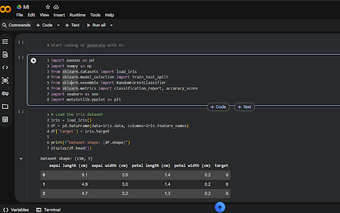
Colab Printer Pro from colabprinterpro.com is a Chrome extension built to convert Google Colaboratory notebooks into professional documents for reporting and sharing. It reformats the notebook DOM into PDFs that preserve code cells, outputs, and LaTeX rendering, avoiding broken layouts that the browser print command produces. Selective cell visibility, custom headers and layout controls give authors control, making the extension useful for data scientists, researchers, students, and educators who require polished exports.
Converts Colab notebooks into documents that keep code and outputs intact
The extension targets the specific structure of Google Colaboratory pages, so it preserves syntax-highlighted code blocks and output cells that typical print functions break. By working with Colab's DOM rather than a generic page snapshot, the extension renders LaTeX formulas correctly and maintains code color schemes for readability. This focus reduces the manual cleanup that follows a standard browser print export for technical notebooks.
Controls page layout and prevents awkward page breaks for print
The tool exposes document-level formatting options so pages do not split code blocks or images mid-content. Users can adjust margins, font sizes, and page orientation and apply custom headers and footers with page numbers or branding. An interactive preview updates as settings change, enabling visual checks before exporting. These controls address the common problem of truncated cells when converting long notebooks to PDF.
Fits research and teaching workflows with browser-based, tab-focused operation
The extension runs inside Chrome and other Chromium-based browsers, which simplifies use across Windows, macOS, and Linux without requiring broad Drive access, since it formats the active tab. One-click formatting options simplify preparing a report for distribution, while the extension imposes no hard page limit; very large notebooks may take longer to process depending on system hardware. This behavior aligns with classroom and publication workflows that rely on browser tooling.
A practical export tool best suited for authors who need print-ready Colab outputs
The extension is a focused solution for users who routinely turn interactive notebooks into formal documents and prefer working inside the browser environment. Expect a trade-off between convenience and processing time on very large notebooks, because rendering happens client-side in the active tab. For those preparing reports, lecture notes, or reproducible papers, the extension offers a direct path from Colab to a shareable PDF.
Pros
Preserves syntax highlighting and code formatting in exported PDFs
Renders LaTeX so mathematical notation appears correctly
Custom headers and footers add page-level branding and numbering
Works in Chrome and other Chromium-based browsers across desktop platforms
Cons
Very large notebooks may take longer to process in the browser
Extension requires a Chromium-based browser rather than an external tool
One-click formatting can obscure granular CSS adjustments for advanced users
Laws concerning the use of this software vary from country to country. We do not encourage or condone the use of this program if it is in violation of these laws. Softonic may receive a referral fee if you click or buy any of the products featured here.